
Keep shooting while your images reach the people who need them.
Transferring photographs during a live event can interrupt your shooting and delay delivery. TransferPilot automatically moves images between your Mac and an FTP server, so your editor, communications team or client receives them quickly.



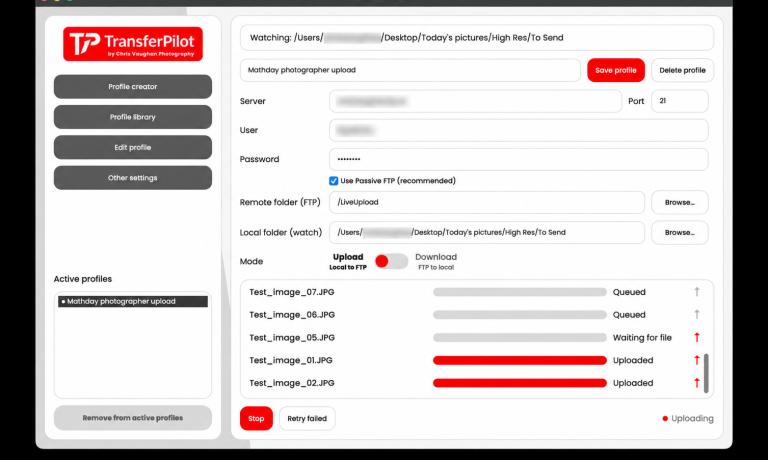
Automatically upload new files from a watched folder
Automatically download new files from an FTP server
Save reusable profiles for different workflows
Set it once. Let TransferPilot handle the rest.
-
Create a profile Enter your FTP details and choose the remote and local folders you want to connect.
-
Choose the direction Select Upload to send new files from your Mac, or Download to automatically receive new files from FTP.
-
Start transferring Start the profile and TransferPilot will monitor the selected folder, transferring new files automatically while the application is running.
Frequently asked questions.
-
What do I need to use TransferPilot?
You need a Mac running macOS 12 Monterey or later, access to an FTP server and a working internet connection. TransferPilot does not provide FTP hosting.
-
Does TransferPilot work on Intel and Apple silicon Macs?
Yes. TransferPilot is supplied as a universal macOS application supporting both Intel and Apple silicon Macs.
-
Can it both upload and download files?
Yes. Each profile can be configured to upload files from your Mac to FTP or download files from FTP to your Mac.
-
Does TransferPilot need to remain open?
Yes. TransferPilot monitors and transfers files while the application is running.
-
How many computers can I use it on?
One licence is for one named user and can be used on up to two Macs.
-
Is it downloaded from the Mac App Store?
No. TransferPilot is downloaded directly from Chris Vaughan Photography. The application is digitally signed and notarised by Apple.
-
What happens after I purchase?
Your download and licence information will be sent to the email address entered during checkout.
-
What support is included?
Email support is included with your purchase. We aim to respond within two working days. Support covers installing and using TransferPilot, but does not include configuring or administering third-party FTP servers.
-
Are updates included?
Your purchase includes maintenance, security and compatibility updates for the current major version of TransferPilot. A future major version containing substantial new functionality may be offered as an optional paid upgrade.
-
What is the refund policy?
If TransferPilot is unsuitable, contact us within 14 days of purchase. Refund requests will be considered in accordance with our refund policy and your statutory rights. Please check the compatibility and FTP requirements before purchasing.
-
How is TransferPilot licensed?
A TransferPilot licence is issued to one named user and may be installed on up to two Macs used by that person. Licences may not be shared between multiple users, transferred or resold without permission.
-
What is an FTP watcher?
An FTP watcher monitors a selected folder and automatically transfers new files when they appear. TransferPilot can watch a local folder and upload new photographs to FTP, or monitor an FTP folder and download new files to your Mac.